Every quote inside your rules. Every follow-up on time.
From the first offer to the confirmed order. Your salespeople quote at today's price with stock in view, discounts stay inside your limits, and no follow-up slips. When the customer's PO arrives, every team works from one record.
- Quotes at today’s price, with photos if you choose
- Discounts kept inside your limits
- Follow-ups the system will not let slip
- One order record for every team
You are the salesperson. Win the deal.
ABC Engineering wants 120 displays and 20 room kits, worth about ₹45 lakh. Five decisions stand between you and the order. Choose the way your team works today, or the QERP.CRM way, and watch what happens.
ABC Engineering’s inquiry lands on your phone. What do you send?
Mr. Rao wants a quote by tomorrow for 120 Model K-40 displays and 20 Room Kit RK-2.
Nothing about a deal lives in someone's head.
Pick one.
Upload the PO once. Every team works from it.
When the customer's PO arrives, it is uploaded against the offer. Credit limit and credit days are checked. Stock is checked line by line, and short items go straight to purchase.
Purchase, warehouse, dispatch and finance all open the same record, so nobody asks sales “what did the customer order?”
| Sales | Offer V2, customer PO |
| Purchase | 80 units short, PO drafted |
| Warehouse | 20 kits to build |
| Dispatch | Lot 1 due Tue |
Sales doesn't work alone. Neither does the system.
Point at a department, or tap it, to see what it shares with sales.
What your sales team gets.
Built by people who sell for a living.
We built QERP.CRM inside our own distribution business, where every rupee of discount comes out of margin. It ran that business for seven years before we offered it to anyone, and the company grew 3X in five years.
Questions sales heads ask
01Can our salespeople still give discounts?
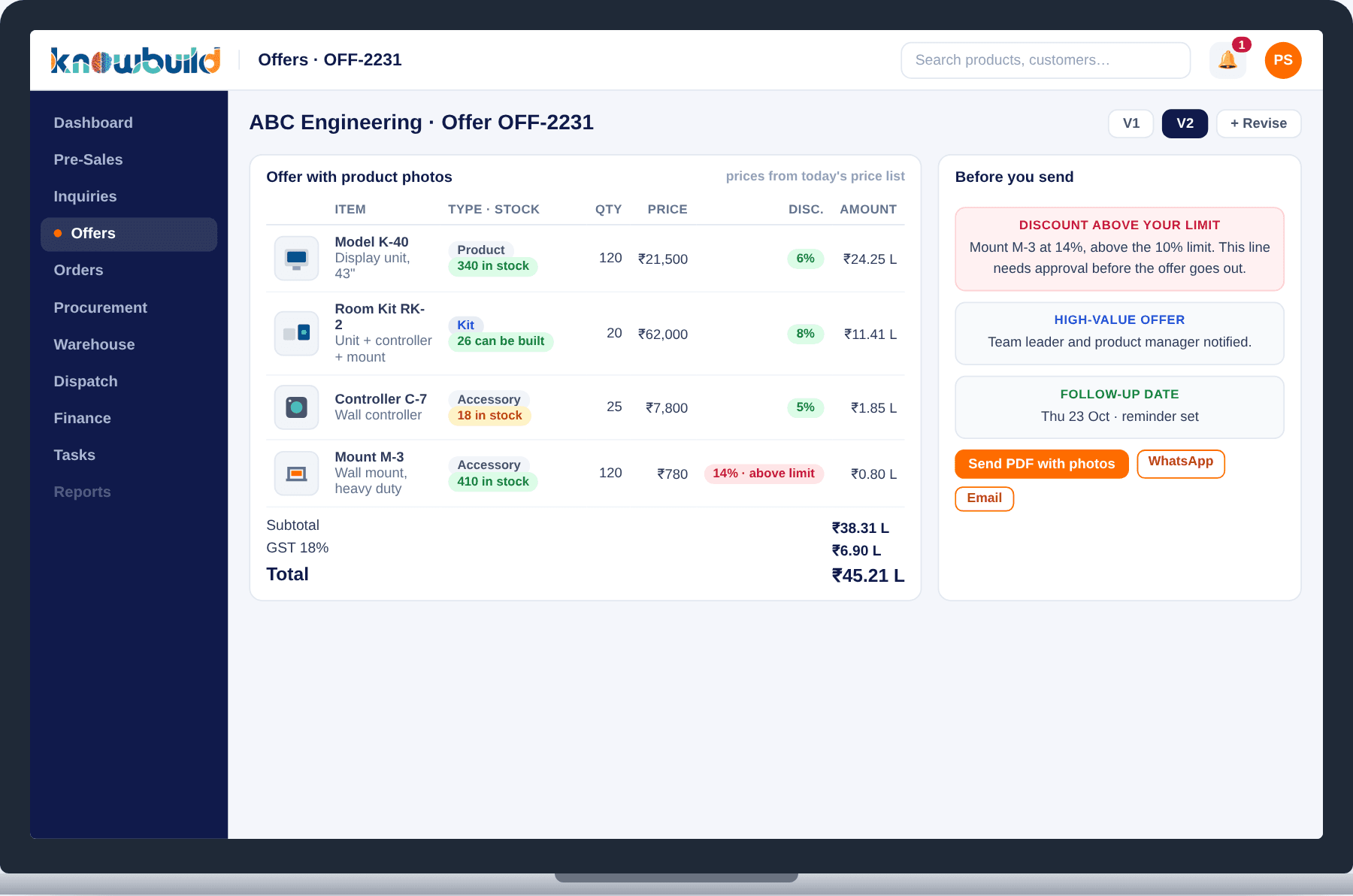
Yes, within the limits you set. Quantity discounts follow your company’s rules. If a line goes beyond the limit, it needs approval before the offer can go out.
02Can we send quotes on WhatsApp?
Yes. An offer can go out as a PDF, on WhatsApp or by email, with or without product photos. A follow-up date is set when it is sent.
03What is the difference between this and Sales OS?
Sales OS is the sales part on its own, for companies that only need to manage sales. QERP.CRM adds purchase, stock, dispatch and finance. You can start with Sales OS and move up later with all your data.
04Can a salesperson see other salespeople’s deals?
Only if you allow it. Access is set by role, so a salesperson sees their own work and a team leader sees the team’s.
05Do we have to stop using Tally?
No. Keep Tally for your final accounts. QERP.CRM runs the day-to-day business around it: inquiries, quotes, purchase, stock, dispatch and collections.
06How long does it take to go live?
Usually 5 to 30 days, depending on how organised your data is. Our team sets it up with you, and the first month of onboarding is included.
Take back control of your sales. Control wapas lijiye.
See Sales set up with your own products, prices and customers in a 30-minute walkthrough.