Buy what you need, before you run out.
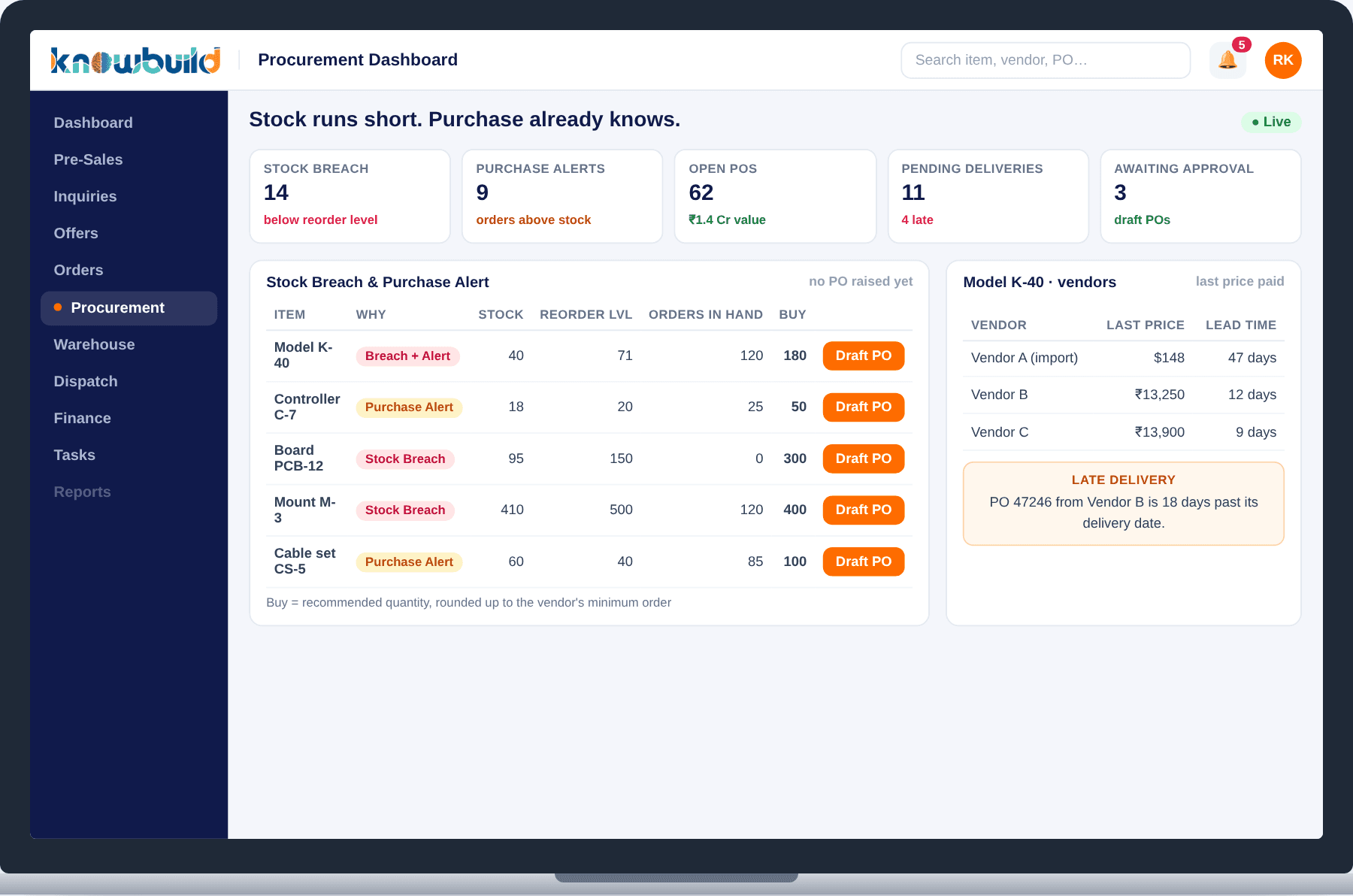
When stock runs low, or confirmed orders need more than you hold, your purchase team sees it first. They get a recommended quantity, every past vendor and the last price paid. One click drafts the PO.
- No more stock-outs found by the customer
- Buy the right quantity, not a guess
- Know the last price before you negotiate
- See every late delivery
How most SMEs buy today. And what changes.
Point at a card, or tap it, to see what QERP.CRM does about it.
Stock Breach lists every item that has fallen below its reorder level, the day it happens, before any customer asks.
Purchase Alert shows every item where confirmed orders need more than you hold, as soon as the order is confirmed.
Every past vendor and the last price paid, for any item, on the same screen as the PO.
Every open PO is tracked against its delivery date. Late ones stand out on the purchase screen.
Stock Forecasting plans purchases from your open offers, opportunities or past sales, and shows the sum behind every number.
Try it below →
From a stock alert to goods on the shelf, in seven steps.
Follow one item, Model K-40, through the system. Click any step, or let it play.
The moment stock falls to or below the reorder level you set, the item appears on the purchase screen in red. It stays red until a PO is raised.
How much should we buy for next month? Work it out yourself.
Stock Forecasting shows the sum behind every number, so your purchase team never has to trust a figure it cannot check. Move the sliders and watch the answer change.
The sum, step by step
Buy 180 to cover the expected demand and keep your safety stock, after counting what is already on order.
Know what you paid last time, before the vendor tells you.
Every item carries its buying history. Pick one.
Three vendors, three prices, one screen.
The buyer sees who supplied it, when, and at what price, before calling anyone. The cheapest recent price is not hidden in someone’s inbox.
Monthly, quarterly and yearly purchase trends are a click away.
| Vendor | PO | Qty | Price | Date |
|---|---|---|---|---|
| Vendor A | 47112 | 150 | ₹1,840 | 12 Aug |
| Vendor C | 46987 | 100 | ₹1,870 | 19 Feb |
| Vendor B | 46820 | 200 | ₹1,905 | 03 Jun '25 |
Purchase doesn’t work alone. Neither does the system.
Point at a department, or tap it, to see what it shares with purchase.
See Sales →
What your purchase team gets.
Built where stock really runs out.
We built QERP.CRM inside our own distribution business, where a missed reorder means a lost order. It ran that business for seven years before we offered it to anyone, and the company grew 3X in five years.
Questions purchase heads ask
01Does it place orders with vendors on its own?
No. It tells your team what to buy and how much. Your buyer drafts the PO in one click, and it goes to the person you choose for approval. Nothing is ordered without a person deciding.
02Where does the recommended quantity come from?
From your reorder level, the orders you have already confirmed, the stock you hold and what is already on order. If the vendor has a minimum order, the quantity is rounded up to it. Every number behind it can be checked.
03What if the vendor sends only part of the order?
Receive what has arrived on its own MRN. Stock goes up for that lot, the balance stays open on the PO and in pending deliveries, and each lot becomes a payable on the PO’s payment terms.
04Does Finance have to enter vendor bills again?
No. Purchase and Finance work from the same record. Goods received against a PO go straight into payables, with the due date worked out from the payment terms on the PO.
05Can we buy imports in foreign currency?
Yes. Domestic and import purchases sit in one system. Import POs stay in the currency you bought in, with the bill of entry and airway bill recorded against them.
06Can our purchase team see our offers and prices to customers?
No. Stock Forecasting uses the total demand from your offers and opportunities. Purchase sees the quantities it needs, not the offers themselves.
07Do we have to stop using Tally?
No. Keep Tally for your final accounts. QERP.CRM runs purchase, stock, dispatch and collections around it.
08How long does it take to go live?
Usually 5 to 30 days, depending on how organised your data is. Our team sets it up with you, and the first month of onboarding is included.
Take back control of your purchasing. Control wapas lijiye.
See Procurement set up with your own items and vendors in a 30-minute walkthrough.