ERP + CRM for Manufacturers Who Assemble and Supply
Bill of materials, built in. Build products ahead and keep them in stock, or put them together as a kit at dispatch. Either way, KnowBuild shows what you can build today, tells purchase exactly which parts to buy, and keeps every part in stock correct.
Multi-level BOM
Products, sub-assemblies, parts
Build Ahead or At Dispatch
Your choice, product by product
Complete Dispatch
Checked against the quote
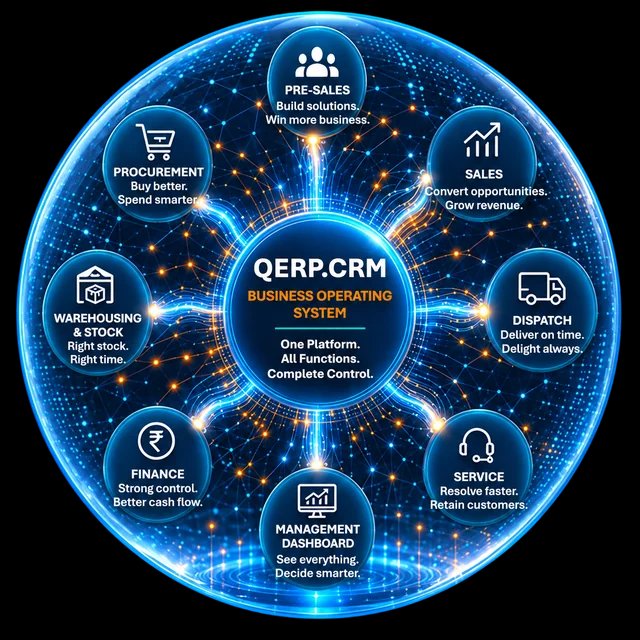
Built for manufacturers who assemble from bought-out parts. If you assemble products from bought-out parts and sub-assemblies, sell by quotation to OEMs, plants and contractors, and dispatch complete orders, QERP.CRM, KnowBuild's Business Operating System, will become the basis for you to manage and grow your business.
 View Offers · Photo-based offer
Your Company Pvt Ltd
Water Treatment Equipment · Skids · Spares
OFFER
OF/2026/0533 · 04 Oct 2026 · V3
To: Projects Head, Ganga Beverages Pvt Ltd, HaridwarWater treatment for the new bottling line
Delivery: 5 weeks from approved drawings and PO · Payment: 40% advance, balance before dispatch · Offer validity: 15 days
Rupees Fourteen Lakh Ninety-Two Thousand Five Hundred Fifty-Eight Only
Photo-based offer format · product images are representative · illustrative data
What KnowBuild does for your business
Bill of materials, built in. Two ways to build.
Save each product once with its parts and sub-assemblies. Then choose, product by product, whether you build it ahead or put it together when you ship.

 PRODUCT MANAGER
RO Plant 2000 LPH · BOM
2 levels• Short: Membrane housing
One parts list, many levels
Each product carries its bill of materials, including sub-assemblies that have their own parts. KnowBuild shows how many you can build from stock, and which part is holding you back.
 INVENTORY CONVERSION
Build ahead · Dosing Skid
Built• Ready to sell from stock
Build ahead, sell from stock
For products you build before the order comes in, record them as finished stock. Every part used comes off stock and the finished units go on, in one step.
 DISPATCH
Kit at dispatch · Spares Kit
Shipped• Parts reduced at dispatch
Or put it together as you ship
For kits and sets, keep only the parts in stock. When the kit is dispatched, KnowBuild takes each part off stock automatically.
Real challenges. We understand.
Common challenges for assemblers
Custom BOMs, hundreds of bought-out parts and milestone payments make it easy for sales, stores and accounts to fall out of sync.
Which quote was approved?
The specs changed three times. Versions go back and forth on email, and no one is sure which one the PO matches.
One part is missing
You promise a delivery date, then find one short part holds up the whole order.
Purchase buys by memory
One part is short and another piles up, just when assembly starts.
Stock shows parts that are gone
Parts are taken out for assembly without any record, and the next quote is promised against stock that isn’t there.
Where assembly businesses can make more money
Eight ways KnowBuild grows your revenue and protects your margin
Each one comes from manufacturers who assemble and supply. Under each is what KnowBuild does about it, and the screen where it happens.
You can be a bigger company. You only need to systemise.
Knowbuild gives you an enterprise-grade system at SME prices.
Sound familiar? Most manufacturers who assemble and supply we meet recognise at least three of these. Book a 30-minute walkthrough
Three kinds of assemblers
What you assemble decides where KnowBuild pays back first
Quote fast, build from stock
Switchgear, wiring, sub-assemblies
Control, power and automation panels are built from enclosures, switchgear and wiring sets. The win is quick quotes and knowing what you can build today.
- Multi-level bill of materials, including wiring sub-assemblies.
- See how many you can build from the parts in stock.
- Purchase Alert for parts confirmed orders will run short of.
- Every item scanned against the order before dispatch.
Who this is for
Builders of LT, MCC, APFC and PLC panels. See our page for control panel manufacturers.
One order, one record
From first inquiry to final payment, every team works on the same order
Here is how an order moves through KnowBuild, using a water treatment plant order as the example.
Inquiry Manager
Inquiry
A projects head sends an inquiry with specs. It goes to the right salesperson.
Lead Manager
Lead
The need is real. The company and its people (who approves, who pays) are saved.
View Offers
Offer
The plant is quoted from its bill of materials at today’s prices, with a follow-up date.
Opportunities
Opportunity
The client is serious. The deal now counts in your sales forecast and your purchase plan.
Confirmed Orders
Order Confirmed
The PO comes in and a Delivery Order is made. Purchase sees every part the order needs.
Order Closed
Order Closed
Delivered and fully paid. Until then, the amount due stays against the salesperson.
From enquiry to payment
Know exactly where every order stands.
- Salesknows which version the client approved.
- Storesknows which parts the build needs.
- Purchaseknows what to buy, for real orders.
- Managementknows what has been collected.
Without a connected system
- Product BOMs scattered across Excel files
- Buildability checked by hand, too late
- Purchase buys by memory, one part short
- Store shows parts already inside finished units
- Overdue invoices noticed only when cash is tight
With KnowBuild
- Saved BOMs with versioned quotes
- Buildability known before you promise a date
- Purchase told exactly what confirmed orders need
- Build ahead or build at dispatch — stock stays correct
- Receivables visible, with reminders that go out on time
Real screens. Real data.
What your team sees in KnowBuild
Illustrative data
How many you can build, in one line
For every product with a bill of materials, built ahead or kit at dispatch, your team sees how many you can supply today and which part is short.
Illustrative data
Buy for real orders, not guesses
See which parts your confirmed orders will run short of. If one part goes into many products, you see all of them.
Two ways to start
Start where it hurts most, and expand once it works
Run the whole business on one system
For makers who hold material, deliver to sites and give credit to institutions.
- Inquiries, offers and follow-ups in one place
- Products with their parts list, and how many you can make today
- Alerts telling purchase what to buy, and when
- Delivery orders, barcode checks before despatch, e-invoice and e-way bill
- Payments due, reminders and credit limits
Sales OS: the Revenue Operating System
For firms whose biggest need is quoting, follow-ups and collections, and who want to keep Tally for now.
- Every inquiry captured and given to the right salesperson
- Quotes within discount limits, with follow-up reminders
- Orders, dispatch instructions and payment tracking
- Works alongside Tally, and moves up to QERP.CRM later
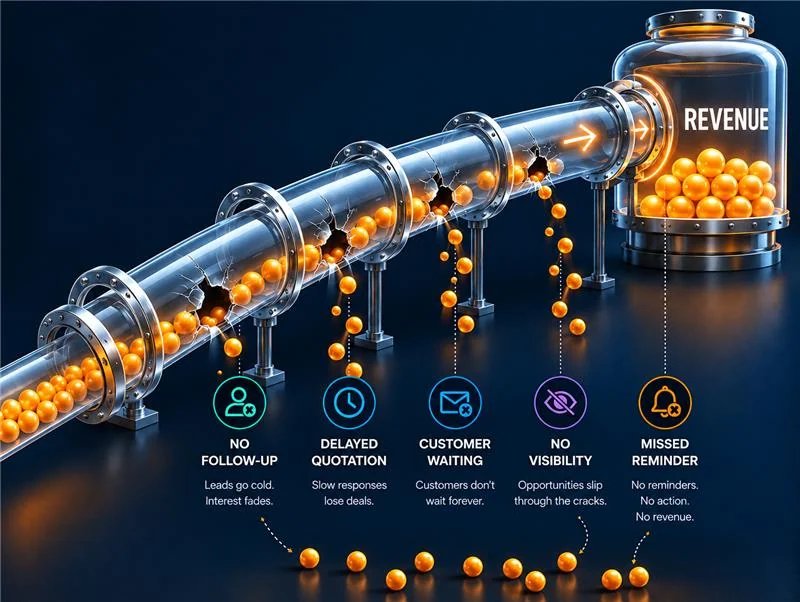
Real outcomes for growing assemblers
Better control from quotation to delivery
KnowBuild helps growing assemblers streamline operations and reduce owner dependency.
Faster quotations
Win more OEM and plant deals
Buildability known
Promise dates you can keep
Smarter buying
Full quantities, better prices
Complete dispatches
Right product, first time
Stronger collections
Improve cash flow
Less owner dependency
A more scalable business
Frequently asked questions
Can we build some products ahead and put others together at dispatch?+
Yes. For each product you choose how it is fulfilled: built ahead and kept as finished stock, or put together as a kit when it is dispatched. Both use the same bill of materials, and stock stays correct either way.
Our products have sub-assemblies. Can KnowBuild handle that?+
Yes. KnowBuild supports multi-level bills of materials: a product can contain sub-assemblies that have their own parts. It shows how many units you can build from stock.
Does KnowBuild schedule our shop floor?+
No. KnowBuild does not schedule machines or track work orders between production stages. It connects your quotes and orders to parts, stock, delivery and payment.
Do we have to stop using Tally?+
No. Keep Tally for your final accounts. You can start with Sales OS next to Tally to fix inquiries, quotes, follow-ups and payments, and move stock, purchase and dispatch onto KnowBuild when you are ready.
Every order is a little different. Is that a problem?+
No. Save your standard products once. Custom products are saved in the system too, so if a client wants the same one again you can quote it without starting from scratch.
How do we start?+
With a 5-user pilot on the one area that hurts most, usually quote-to-order or order-to-delivery. You grow from there once it works.