Knowbuild
Sales OS CRM · The Revenue Operating System

Sales bhagwan bharose chal rahi hai?

Are your sales running on luck?

Inquiries in someone's phone. Quotes in a Word file. Follow-ups in someone's memory. If you can't see what is coming in and what is going out, you can't grow.

Sales OS is the sales CRM for B2B companies that sell by quotation. Every inquiry is captured and assigned, every quote goes out properly, every follow-up happens on time, and the owner sees all of it, live. Control wapas lijiye. Take back control.

📈Built on the system that helped an Indian distributor grow 3X in five years. Now for your sales team.
  • Every inquiry answered
  • Quotes from the system, not a Word file
  • Every follow-up on time
  • Payment calls set after delivery

Keep Tally or Busy for accounts. Need stock, purchase, dispatch and GST e-invoicing too? Move up to QERP.CRM, with all your data.

Click any step to explore it

Where every sale starts

Do you know how many inquiries came in today? Sales OS does.

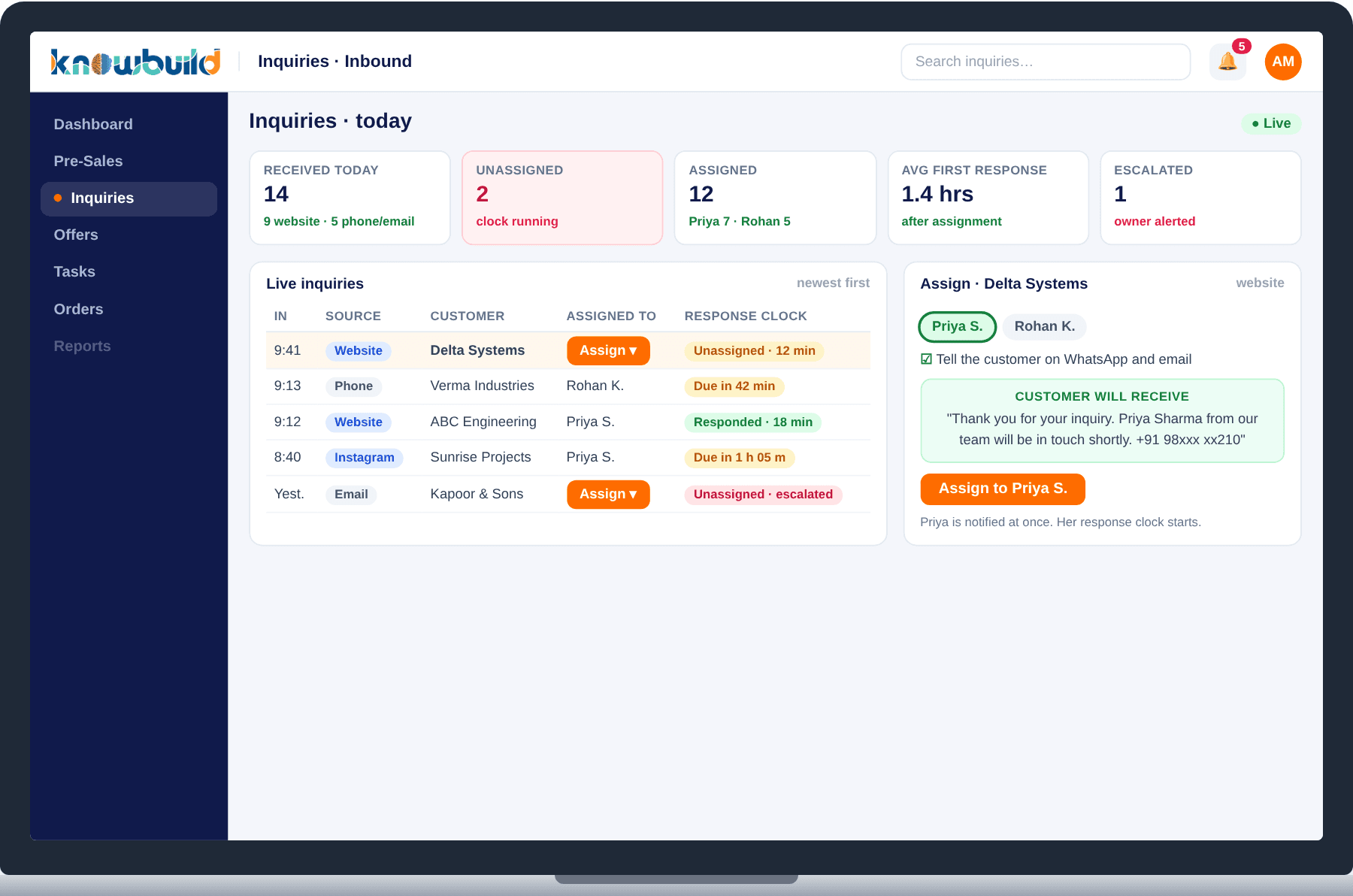
Inquiries from your website, IndiaMART and Instagram arrive on their own. Those that come by email, phone, a walk-in visit or an exhibition are keyed in by your team in seconds. Every one is assigned, and the customer is told who will call.

Watch an inquiry arriveClick any source, or let it play

Captured automatically

Keyed in by your team

Click a source to see the inquiry…
Sales OS · Inquiries14 today
KeyedVerma IndustriesRohan
AutoABC EngineeringPriya
① Captured② Assigned to a salesperson③ Customer told who will call
Across every step · WhatsApp and email

Your customer knows who will call, before anyone has called.

Sales OS sends each update to the person who needs it, on WhatsApp and by email. Customers know who will call and that their quote is being followed up. Your team knows what to do next. The owner knows what slipped.

KnowbuildBusiness account
TODAY
Customer told who will callWhatsApp + email on assignment
KnowbuildBusiness account
TODAY
The salesperson knowsNew inquiries, offer follow-ups
KnowbuildBusiness account
TODAY
The owner sees escalationsWhat slipped, before Saturday
KnowbuildBusiness account
TODAY
Customers stay in the loopQuote follow-up updates
The alerts are only half of it. The owner also gets one screen with everything.See the owner's screen
Control wapas lijiye · Take back control

What the owner sees at 7 pm, without calling anyone.

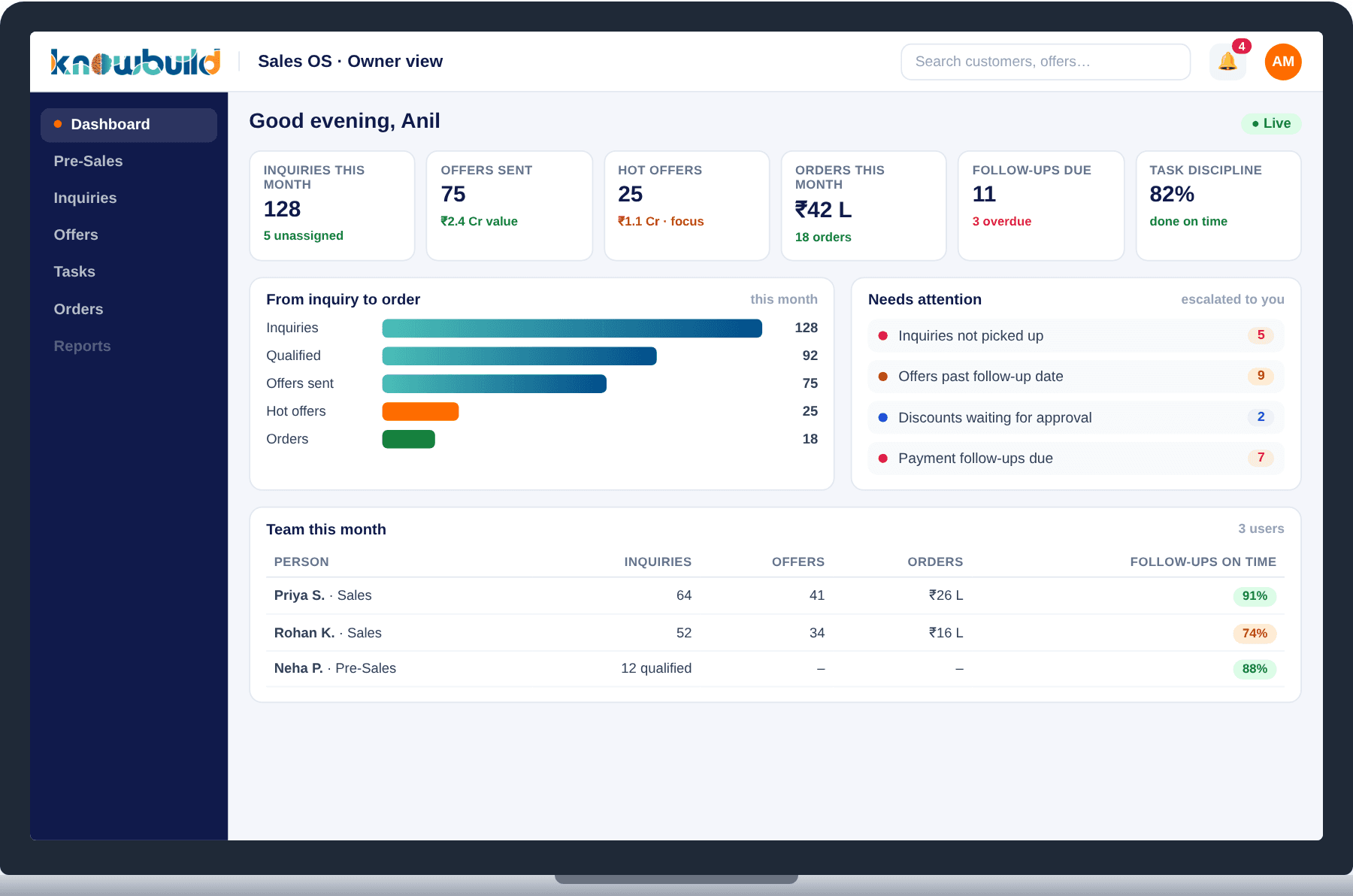
Inquiries, offers, hot offers, orders and follow-ups due, plus what each person in your team did this month. No calls, no spreadsheets, no waiting for Saturday's report.

Owner view dashboard

Representative view · Owner view

Who it is for

Two kinds of companies come to us. Which one are you?

You are winning business, but quotes still go out from a Word file, inquiries sit in phones and follow-ups depend on memory. With no control over what comes in and what goes out, the company stays the size of the owner. Sales OS puts the system in place now, so you can grow without everything coming back to you.
Every inquiry capturedWebsite, IndiaMART and Instagram, automatically
Without a systemInquiries sit in inboxes and phones
With Sales OS ↻ point or tap
With Sales OSEvery inquiry captured

Website, IndiaMART and Instagram inquiries arrive on their own; the team adds phone and email ones. Nothing is lost.

See it →
Every inquiry ownedThe customer knows who will call
Without a systemNobody knows who is handling it
With Sales OS ↻ point or tap
With Sales OSEvery inquiry owned

Each inquiry is assigned to a salesperson, and the customer is told on WhatsApp and email who will be in touch.

See it →
Follow-ups on timeReminders, then escalation
Without a systemFollow-ups depend on memory
With Sales OS ↻ point or tap
With Sales OSFollow-ups on time

Every follow-up has a date. Miss it and the system reminds the salesperson, then tells the owner.

See it →
Quotes from the systemBranded PDF, from your price list
Without a systemQuotes go out from a Word file
With Sales OS ↻ point or tap
With Sales OSQuotes from the system

Offers go out as professional PDFs, with or without product photos, with quantity discounts by your rules.

See it →
Every deal, visible liveThe owner sees everything at 7 pm
Without a systemUpdates on WhatsApp, report on Saturday
With Sales OS ↻ point or tap
With Sales OSEvery deal, visible live

Inquiries, offers, orders and follow-ups visible live, plus what each person did this month. No calls needed.

See it →

Point at a card, or tap it, to see the difference.

For large teams · Coming March 2027

When your team is on the road, you still know where every deal stands.

The Sales OS mobile app is in design now. It takes the system into the field: salespeople plan visits, log them from the customer's door and record what happened, by voice. Managers see every visit, where it happened, how long it took and what came out of it.

  • Pre-visit briefing: open offers, last visit notes and planning notes before walking in
  • Arrival logged with GPS and time; a different location is flagged, never blocked
  • Meeting and outcome notes by voice, with the next action set before leaving
  • New inquiries from Google Maps, and visiting cards scanned straight into the system
  • Visits, kilometres and meeting time in a travel log, ready for reimbursement
  • Each salesperson's own targets and follow-ups on their phone

In design · planned launch March 2027. Today, Sales OS runs on desktop and laptop.

‹ NavigateArrived
📍
Location matchedGPS verified · within 45 m of the saved pin
CustomerShree Ram Industries
Arrival time10:47 am ✓
Travel18 min · 4.2 km
✓ Confirm arrival · start meeting

Arrival time and GPS are logged automatically

Arrival, GPS verified
Visit loggedShree Ram Industries
Arrived11:02 am
Left12:39 pm
Duration1h 37m
Distance18.4 km
Outcome🤝 Positive
GPS✓ Verified
🎤 Outcome notes · voiceBudget approved. PO by Friday. Wants a demo next week.
📅 Next actionDemo visit scheduled · Thu 3 Jul, 2:00 pm

18.4 km added to the travel log for reimbursement

Visit logged, next step set
Every leak costs you

How much revenue did you lose this month? Without anyone noticing.

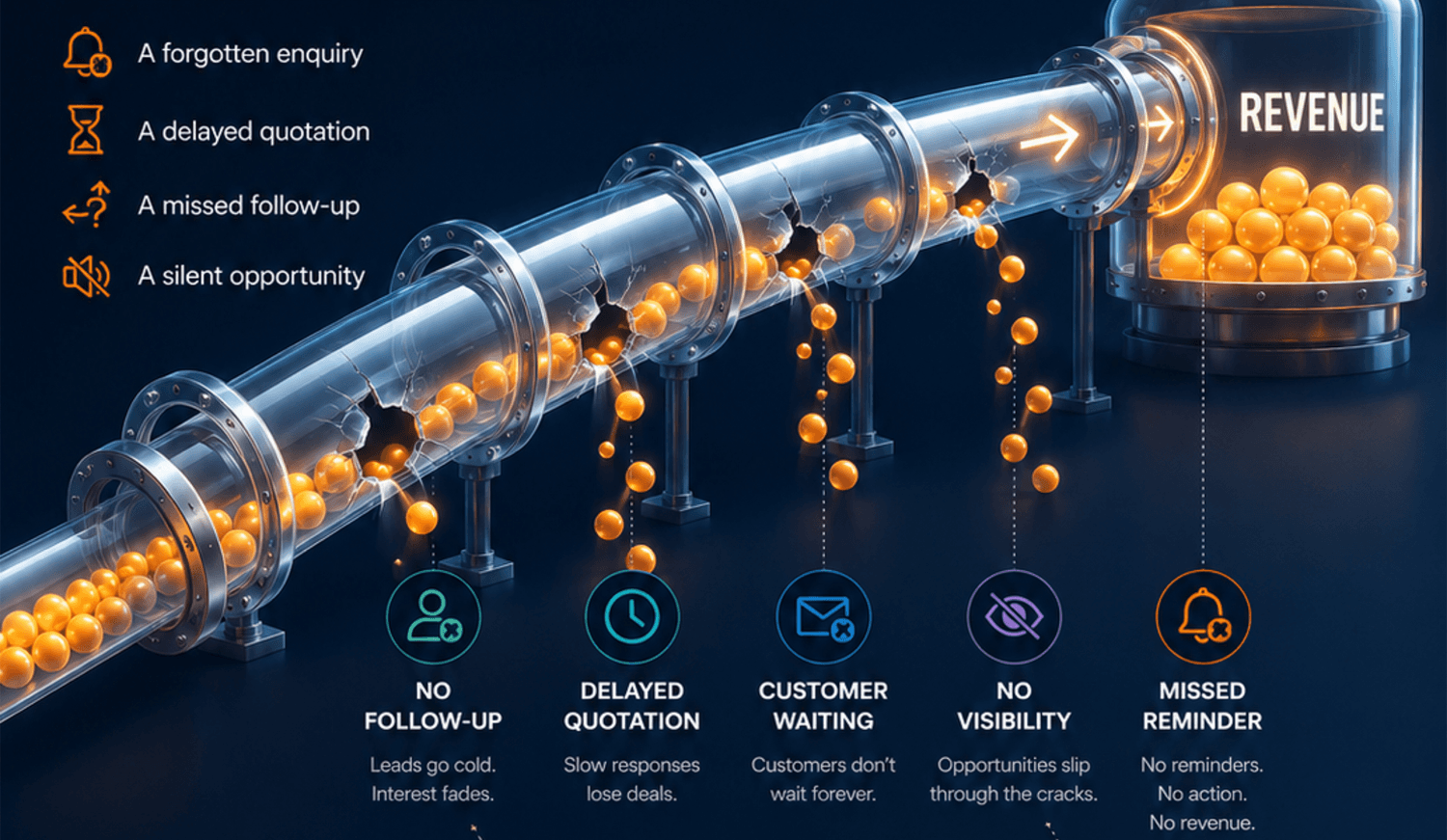
Revenue rarely disappears overnight. It leaks, quietly: a forgotten inquiry, a delayed quote, a missed follow-up. Click a leak to see how Sales OS plugs it.

Click any leak

A week with Sales OS

Anil's week, before and after Sales OS.

Anil runs a growing B2B business with two salespeople and one pre-sales executive. Follow one order through their week.

Before · Monday, 9:40 pm

Anil is still on WhatsApp. A customer says nobody called back about last week's inquiry. Rohan isn't sure which quote version he sent. Two payments are late and nobody has called. The weekly report will come on Saturday.

Sales chal rahi hai, bhagwan bharose. Every answer is in someone's head, so every question comes to Anil, and the team can only sell as fast as he can keep track.

After · the same week, on Sales OS

Monday9:12 am

Every inquiry is caught, and the customer is told who will call

A buyer fills in the form on Anil's website, and it lands in Sales OS on its own. Another calls, and the team adds that inquiry too. Each is assigned to Priya or Rohan, and the customer gets a WhatsApp and an email saying who will be in touch. Priya's response clock starts.

Website, IndiaMART, InstagramAssign in one clickCustomer told who will callResponse clock
Showing on screen

You're looking at: Inquiries

Inquiries

Representative view · Inquiries

Monday11:00 am
Next →

Neha qualifies a new buyer and hands it to sales

Neha works through this week’s target list, calling and recording every conversation. Nova Systems has a budget and a need, so she hands it to sales as an inquiry, with her notes attached.

Target listEvery call recordedQualified buyers handed to sales
See this screen →
Tuesday10:05 am

Priya sends an offer quote with photos, inside the rules

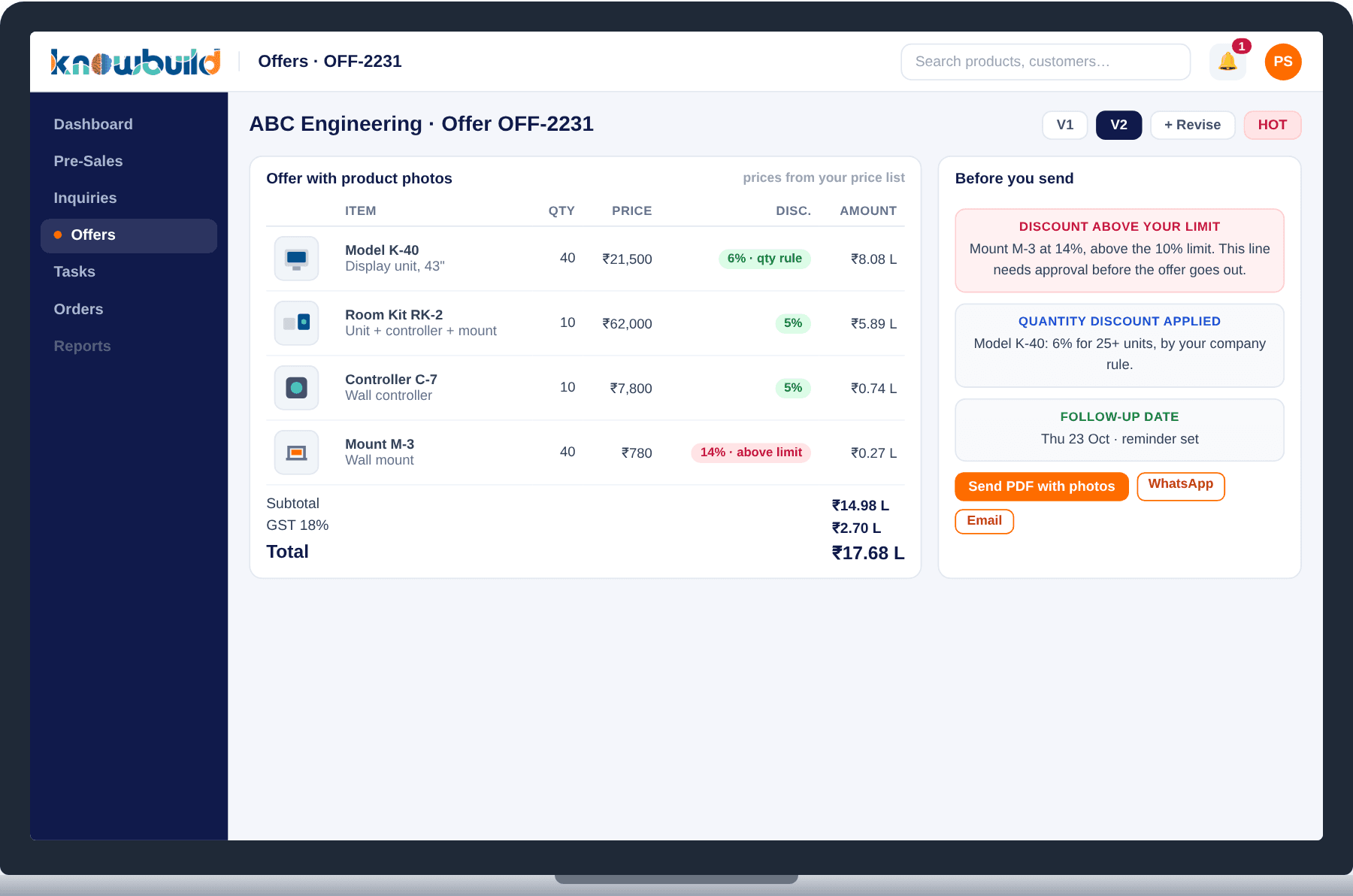
She builds the offer from the price list, with product photos. Quantity discounts apply by Anil’s rules, and one line above the limit goes for approval. Big offers are marked HOT so the owner can see where to focus. She sets a follow-up date.

With or without photosQuantity discounts by your rulesDiscount approvalRevisions V1 → V2
See this screen →
Thursday10:00 am

The follow-up happens, because the system asks for it

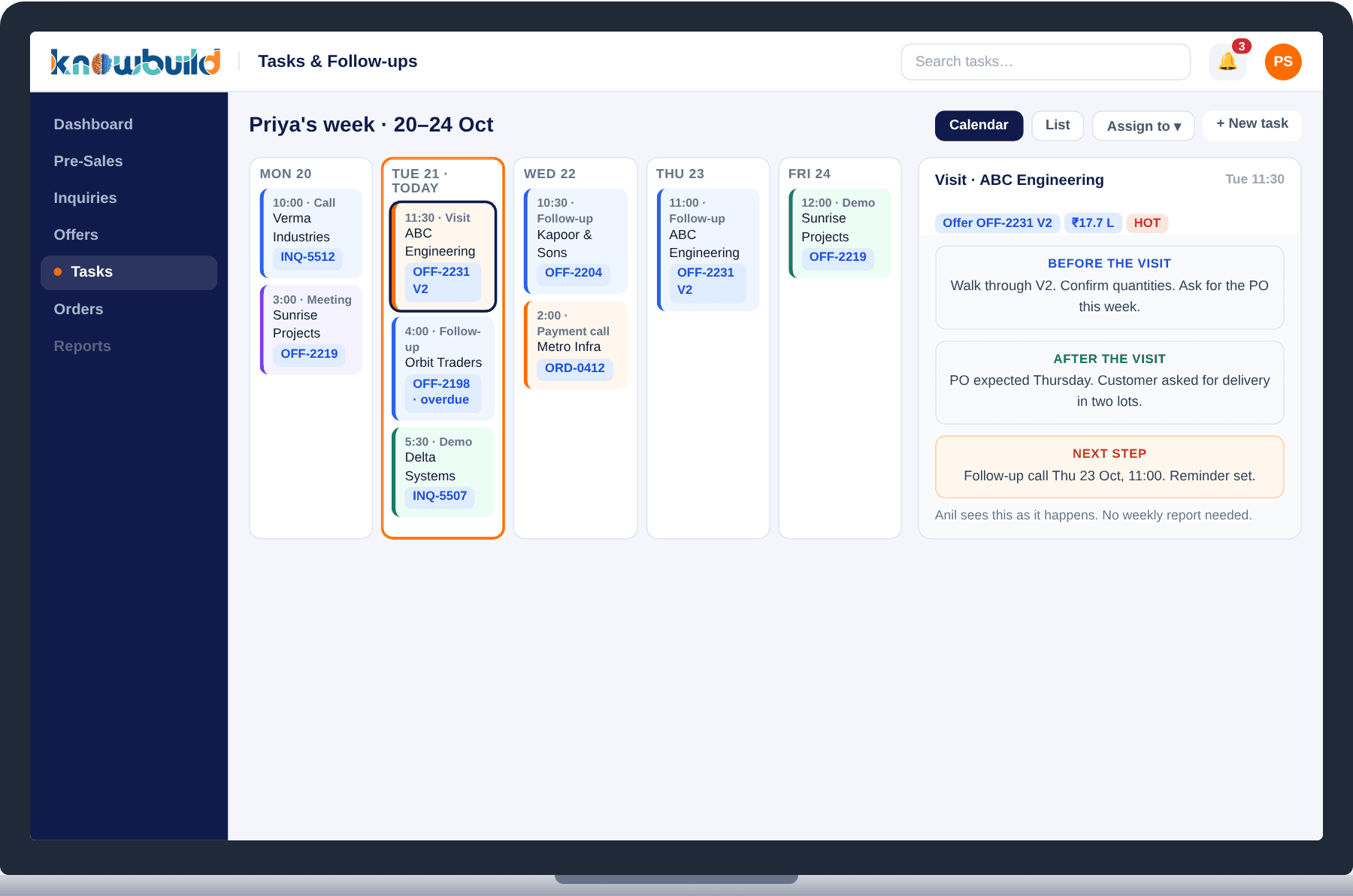
Priya is reminded to follow up with ABC Engineering today. Rohan missed a follow-up yesterday, so he was reminded and Anil can see it. Every call, visit and demo sits on the inquiry or offer it belongs to, so nobody writes a weekly report.

Follow-up remindersEscalation to the ownerTasks linked to each deal
See this screen →
Next Monday3:30 pm

The order is confirmed, and delivery is tracked

ABC Engineering sends its PO. Priya converts the offer to an order in one click and attaches the PO. A delivery order records exactly what must be delivered, in two lots, and a follow-up task is created for the second lot.

Offer to order in one clickCustomer PO attachedDelivery orderPart deliveries
See this screen →
Afterdelivery

A payment follow-up is set, so somebody calls

Once the order is delivered, Priya sets a payment follow-up task on it, and Anil can see it. If the call is missed, she is reminded. Invoices, payments and accounts stay in Tally.

Payment follow-up tasksVisible to the ownerAccounts stay in Tally
See this screen →
Every day7:00 pm

Anil sees his whole sales picture on one screen

Inquiries, offers, hot offers, orders, follow-ups due, and how each person is doing. Anil didn't chase anyone today.

Owner dashboardTeam disciplineLive, every day
See this screen →

Anil didn't chase anyone this week. Sales chal rahi hai, bhagwan bharose nahin.

A closer look

Where most sales are lost

The first response, the quote and the follow-up. Here is how Sales OS CRM handles each one.

1 · The first response

See where inquiries come from

If nobody answers an inquiry, the system notices.

Small teams lose sales before they ever quote, because an inquiry sat in someone's phone. Sales OS catches every inquiry, sends it to the right person, tells the customer who will call, and starts the clock. If the response slows, the system keeps it moving.

A salesperson is nudged to follow up on an offer

Mon 14 OctPriya sends offer OFF-2231 V2 to ABC Engineering, ₹17.7 L, and sets a follow-up for Mon 21 Oct.
Mon 21 Oct · 10:00 amFollow-up day. Sales OS reminds Priya, in the system and on WhatsApp.
If she logs the follow-upThe reminder clears. If she doesn’t, Anil is told.

Reminder · Follow-up due today

ABC Engineering · Offer OFF-2231 V2 · ₹17.7 L
You planned to follow up today. Last contact 7 days ago.

Log follow-upSet next dateOpen offer

Same alert, on every channel

KnowbuildKnowbuildWhatsApp · to Priya S.
⏰ Reminder: follow-up with ABC Engineering on offer OFF-2231 V2 (₹17.7 L) is due today.10:00 am ✓✓
FromKnowbuild Notifications
ToPriya S.
Reminder: follow up with ABC Engineering today · OFF-2231 V2

Hi Priya,

Your follow-up on offer OFF-2231 V2 to ABC Engineering (₹17.7 L) is due today. Last contact was 7 days ago.

Log follow-up →
  • Website, IndiaMART and Instagram inquiries captured automatically
  • Phone and email inquiries added by the team
  • Assign in one click; the customer is told who will call
  • Response clock, reminders and escalation
  • Today's inquiries and unassigned count at a glance
Inquiries screen

Representative view · Inquiries

2 · The quote

A quote that looks like it came from a big company.

Every offer goes out as a branded PDF, with or without product photos, from your own price list. Every revision is kept. Quantity discounts apply by your rules, and anything above the limit needs approval.

  • Branded quotation PDF
  • With or without product photos
  • Revisions V1, V2, V3, with full history
  • Quantity discounts by your company rules
  • Approval when a discount goes above the limit
  • Send by WhatsApp or email; mark important offers HOT
Show the quote
Representative view · Offer quote

Representative view · Offer quote · Send PDF with photos

3 · The follow-up

Nobody writes a weekly report any more.

Every call, visit, meeting and demo sits on the inquiry, offer or order it belongs to. Each follow-up has a date. Miss it, and the system reminds the salesperson, then tells the owner. The owner sees the work as it happens.

  • Tasks linked to each inquiry, offer and order
  • Follow-up reminders on WhatsApp and email
  • Escalation when a follow-up is missed
  • Calendar and list views
  • Payment follow-up tasks after delivery
  • No weekly reports to chase
Tasks and follow-ups screen

Representative view · Tasks and follow-ups

Grow at your pace

If it wins you one more order, it has paid for itself.

If Sales OS helps you win one or two extra orders, it has paid for itself. Compare it with one missed inquiry, one forgotten follow-up or one quote that went cold.

1 user

The founder who sells

Every inquiry, quote and follow-up in one place, from day one.

Young companies

Start selling like a professional company

Quotes out of Word and into the system. Every inquiry owned, every follow-up on time.

Large teams

A sales system, finally

Every salesperson, inquiry and offer visible to managers, live. The whole team on formal, quote-based selling.

No onboarding chargeWe set it up with you.
WhatsApp + emailMessaging to your team and customers is included.
ISO 27001Two-step login, locked to the owner's email.
Keep TallySales OS creates the revenue; Tally records it.
Need stock, purchase, dispatch and GST e-invoicing too?Move up to QERP.CRM, the full Business Operating System, with all your Sales OS data.
See QERP.CRM

Pricing for your team size is shared in the demo.

3X

Built inside a real business. Proven there first.

Sales OS is the sales half of the system that ran our own distribution and manufacturing business for seven years, where the company grew 3X in five years. Every inquiry owned, every follow-up done. Now for sales teams of any size.

1 to 5+users. Start small, add people as you hire.
Any B2B sellerwho sells by sending quotes: distributors, traders, manufacturers, service firms.
Day oneYour inquiries, quotes and follow-ups in one place from the first day.
Upgrade pathMove to QERP.CRM later, with all your data.
Start knowing. Start building.

The calm of knowing your sales engine is working.

Every question an owner asks at 9 pm has an answer in Sales OS. Click one to see where.

Questions owners ask

01Is Sales OS a CRM?

Yes. Sales OS is a sales CRM, but one that acts: it assigns inquiries, reminds, escalates and keeps customers informed. It is built for B2B businesses that sell by sending quotes. It captures inquiries, assigns them, helps your team send professional quotes, follows up, records orders and deliveries, and sets payment follow-ups, with WhatsApp and email updates to your team and your customers.

Did this answer it?
02Who is it for?

Two kinds of companies. Young companies and startups that want to grow, but still send quotes from Word and have no control over the inquiries coming in and the offers going out. And large companies with big sales teams but no sales system, who want every salesperson and every deal visible.

Did this answer it?
03Do we have to stop using Tally or Busy?

No. Sales OS creates the revenue; Tally or Busy records it. Keep your accounting software for invoices and accounts.

Did this answer it?
04How quickly can we start?

Quickly. We set it up with you, and there is no onboarding charge. Your product categories can be imported at the start. Pricing for your team size is shared in the demo.

Did this answer it?
05Are WhatsApp and email messages included?

Yes. Messages to your team and your customers, such as inquiry assignment, offer follow-ups and escalations, are included, for business updates, not promotions.

Did this answer it?
06What if we need stock, purchase and dispatch later?

Move up to QERP.CRM, the full Business Operating System, and keep all your Sales OS data.

Did this answer it?
07How secure is our data?

Knowbuild is ISO 27001 certified. Login is two-step with an email OTP, locked to the owner’s email. Your data stays confidential and is protected under auditable security controls.

Did this answer it?
?
Didn’t find your question?Post it on the Knowbuild forum. Our team and other business owners answer there.
Ask on the forum ↗
The Second Brain for Your Business

Take back control of your sales. Control wapas lijiye.

See Sales OS CRM set up with your own products and customers in a 30-minute walkthrough.

Keep TallyNo onboarding chargeWhatsApp includedISO 27001

The Second Brain for Your Business. Know your business, build it better.

Contact Us