



Knowbuild
HOMETasks & Notifications
QERP.CRM · Tasks & Notifications

Your sales team stops writing weekly reports. You stop chasing them.

Plan a meeting with planning notes. After it, add outcome notes. Every task is linked to the inquiry, offer or order it is for, so the week's plan and report are always live, for the salesperson and their manager. And when something needs someone, KnowBuild tells them the moment it happens.

Plan and report as you workEvery task linked to a dealNotifications that clear themselves

✓Built for sales teams, and the managers who chase them for reports. If your team plans on WhatsApp and your managers find out about problems too late, Tasks & Notifications in QERP.CRM puts every activity and every alert in one place, linked to the deal it belongs to.

What KnowBuild does for your business

Plan before the meeting. Report after it. Done.

Planning and reporting happen as the work happens, against the deal it belongs to. Notifications make sure nothing waits for someone to notice it.

The plan and the report, in one task
Knowbuild
KnowbuildTask Manager

Site visit · Northstar Infra

Completed
Linked toOffer OF/2026/0416 · ₹14,60,000
Planning notesConfirm specs, ask for PO date
Outcome notesPO expected 20 Oct, 2 units
StatusCompleted

• Plan and report, done in the same task

The plan and the report, in one task

Before the meeting, the salesperson adds planning notes. After it, outcome notes. Both are saved against the offer, so the week’s plan and report are always up to date, with nothing to type up later.

The right person hears first
Knowbuild
KnowbuildNotification

New Inquiry Assigned to You

Action
CustomerABB India Ltd
ProductEarth tester × 2
SourceIndiaMART
Respond within2 hours

• Escalates to your team leader if not answered

The right person hears first

The moment Inbound assigns an inquiry, the salesperson gets a pop-up on whatever screen they are on. Their team leader sees it too, and both clear when the salesperson acts.

Dispatch knows without a phone call
Knowbuild
KnowbuildNotification

New Delivery Order

Action
DODO-2026-0552
CustomerMeridian Engineering College
ItemsEarth tester × 2, +1 more
PaymentAdvance received ₹1,05,000

• Dispatch can plan without a phone call

Dispatch knows without a phone call

Dispatch gets the delivery order with items, required-by date and payment status in the pop-up itself, so they can start before anyone picks up the phone.

Illustrative data. Screens show how tasks and notifications appear in KnowBuild.
Where execution slips

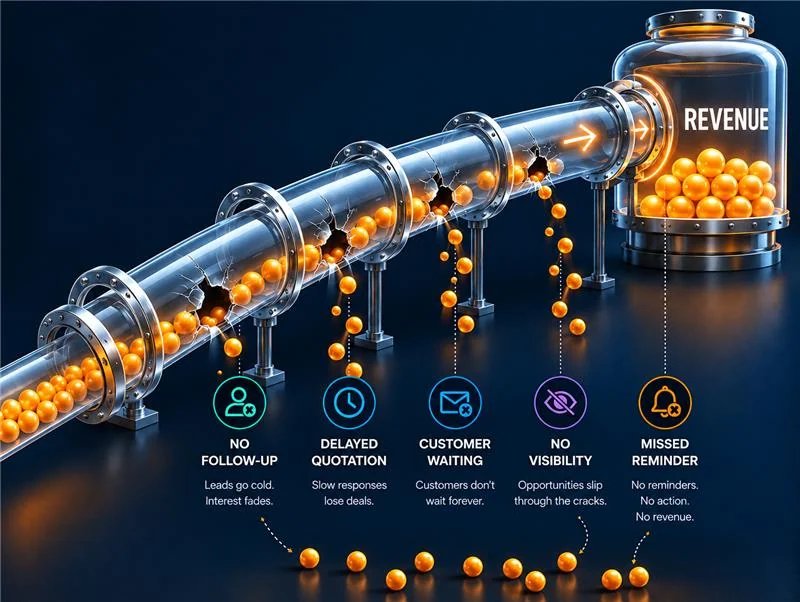
Eight places revenue and margin leak when work lives in WhatsApp and memory.

Select a problem to see the business problem and exactly what KnowBuild does about it.

Before

Every Monday a plan, every Friday a report. Both typed from memory, and both out of date by Tuesday.

Every B2B company asks its sales team for a weekly plan and a weekly report. Salespeople spend hours writing them, managers spend hours chasing them, and by mid-week the plan no longer matches what is actually happening.

Task Manager · Planning and outcome notes

What changes

Planning and reporting happen as the work happens. A salesperson plans a meeting as a task with planning notes: the intent, the questions to ask. After the meeting, they add outcome notes: what the customer said and the expected order value. The plan and the report are always current, so there is nothing to write up at the end of the week.
You can be a bigger company. You only need to systemise.

Knowbuild gives you an enterprise-grade system at SME prices.

Sound familiar? Most owners we meet recognise at least three of these. Book a 30-minute walkthrough

Who gets what

Each person sees what they need to act on, and nothing else

Plan, act, follow up

Tasks, assignments, reminders

Salespeople plan and report as they work, with no weekly write-up, and are told the moment something lands on their desk.

  • Planning and outcome notes on every task, instead of weekly plans and reports.
  • "New Inquiry Assigned to You", with a response window.
  • Follow-up reminders on offers.
  • Payments received, order invoiced and order shipped on their own deals.

Who this is for

Sales executives and inbound sales teams.

Task ManagerAssignmentsFollow-upsPayments

One order, one record

From first inquiry to final payment, every team works on the same order

Here is how tasks and notifications follow one order through KnowBuild, with no weekly plan or report written along the way.

1

Inquiry Manager

Inquiry

An inquiry arrives. If it is not assigned in time, an escalation rises until it is.

2

Lead Manager

Lead

Assigned: the salesperson gets a pop-up, plans a visit with planning notes, and adds outcome notes after it.

3

View Offers

Offer

The offer goes out with a follow-up date. A reminder arrives on that date.

4

Opportunities

Opportunity

A high-value offer alerts the team leader. A PI below the permitted price goes to finance for approval.

5

Confirmed Orders

Order Confirmed

The advance is entered. Sales and dispatch are told at once, and dispatch gets the delivery order.

6

Order Closed

Order Closed

Order invoiced and shipped notifications reach the salesperson. Overdue payments escalate until paid.

Escalation timings, reminder days and value thresholds are set by you in System Configuration. Notifications also go by email, and WhatsApp where you have switched it on.

See the real screens

See the week, and what needs you now

Task Manager · List
AllTo Do 12In Progress 3Backlogged 1Completed 9
TaskTask TypeLinked RecordDueStatus
Site visit, Northstar InfraKey Account ReviewOffer · ₹14,60,000Thu 11:30 AMIn Progress
VC with Meridian CollegeProblem ResolutionOrder ConfirmedFri 2:20 PMTo Do
Review overdue accountsAccounts Receivable ReviewInquiry · Sharma PowerMon 10:00 AMBacklogged
Quarterly review, Apex LabsBusiness Performance ReviewOpportunity · ₹6,20,000Wed 4:30 PMCompleted

Illustrative data

Every task, linked to a deal

Filter by person, month and status. Each task opens the record it belongs to, and every view downloads as a CSV.

Notification Centre
Needs action 7Escalations 3Approvals 1PaymentsOffers
NotificationCustomer / RecordAgeAction
Inbound Inquiry Escalation · L3ABB India Ltd · via IndiaMART2d 4hAssign inquiry
PI Approval RequestPI-2026-0869 · 6% below permitted price12 minApprove / Reject
New Inquiry Assigned to YouNorthstar Infra · earth tester × 225 minOpen inquiry
Advance Received against PIMeridian College · ₹1,05,000 · cleared for dispatch1 hView PI

Illustrative data

Only what is still open

Cards clear themselves when the work is done. Escalations are red, information stays quiet, and the bell counts only what needs you.

Two ways to start

Start where it hurts most, and expand once it works

👍 Recommended for manufacturers

Run the whole business on one system

For makers who hold material, deliver to sites and give credit to institutions.

  • Inquiries, offers and follow-ups in one place
  • Products with their parts list, and how many you can make today
  • Alerts telling purchase what to buy, and when
  • Delivery orders, barcode checks before despatch, e-invoice and e-way bill
  • Payments due, reminders and credit limits
See the full system
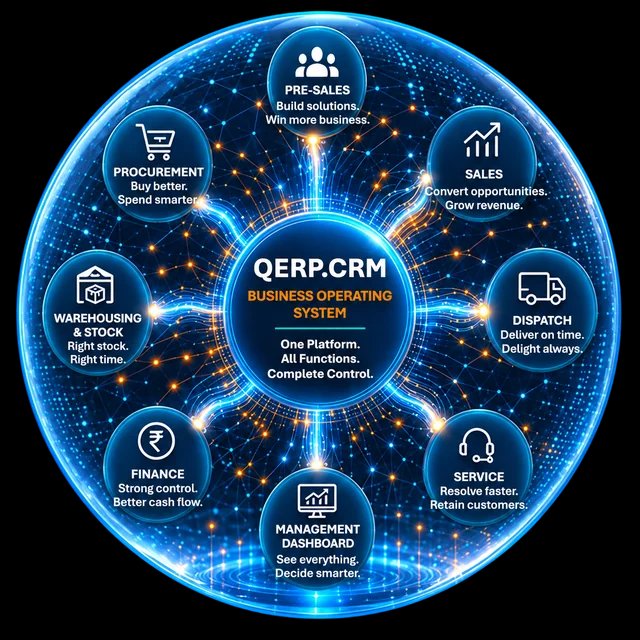
QERP.CRM business operating system connecting every business function
🧮 Keep Tally, fix the selling

Sales OS: the Revenue Operating System

For firms whose biggest need is quoting, follow-ups and collections, and who want to keep Tally for now.

  • Every inquiry captured and given to the right salesperson
  • Quotes within discount limits, with follow-up reminders
  • Orders, dispatch instructions and payment tracking
  • Works alongside Tally, and moves up to QERP.CRM later
See Sales OS
Sales OS revenue operating system turning opportunities into revenue

What's the difference? Sales OS runs your selling: inquiries, offers, follow-ups, orders and payments, working alongside Tally.

QERP.CRM is the full Business Operating System: everything in Sales OS, plus stock, purchase, dispatch, invoicing and finance, all connected. Start with either, and move up any time without losing data.

Most businesses with kits or assemblies begin with a 10 user starter pack on one workflow, usually inquiry-to-order or order-to-dispatch.

3X in 5 years
Built, not imagined

KnowBuild was born inside an Indian B2B business that grew 3X in five years. It has many products, imports and sells locally, and has money locked in stock, just like yours. That business still runs on KnowBuild today.

FAQ

Questions about tasks and notifications

Do our salespeople still need to send weekly plans and reports?↓

No. Each meeting is planned as a task with planning notes, and after it the salesperson adds outcome notes. Because this happens as they work, the plan and report are always up to date. Managers open any team member's calendar or list instead of waiting for a weekly email, and can download it as a CSV for reviews.

Can tasks be linked to a specific deal?↓

Yes. Every task can be linked to an inquiry, lead, offer, opportunity, confirmed order or closed order, and appears in that record's history. You can also link a task to a customer.

Can a manager plan tasks for the team?↓

Yes. Tasks can be assigned to team members, and a manager can view any team member's calendar or list, with counts by status, and download it as a CSV.

Will we be flooded with notifications?↓

No. KnowBuild shows one card per open item, not one per message sent. Cards clear themselves when the work is done, repeats roll up into one card, and the bell counts only what needs you.

Do notifications pop up, or do we have to check?↓

They pop up on whatever screen you are on, and as a browser notification when KnowBuild is in the background. A level 3 escalation stays on screen until someone acts on it.

Can we change the escalation timings?↓

Yes. Escalation periods, reminder days and value thresholds are set in System Configuration, and who receives what comes from your team structure.

How do we start?↓

With a 5-user pilot on the one area that hurts most, usually quote-to-order or order-to-delivery. You grow from there once it works.

30-minute walkthrough

See it with your own team and your own deals.

  • First we understand how your orders run today
  • Then you see your team’s week and your live escalations set up in KnowBuild
  • If KnowBuild is not right for you, we will tell you

Book your walkthrough

Tell us a little about your team on the demo page, and we will set up your week and your live escalations in KnowBuild for the call.

Book my walkthrough →

The Second Brain for Your Business. Know your business, build it better.